
What should a divisible training room do?
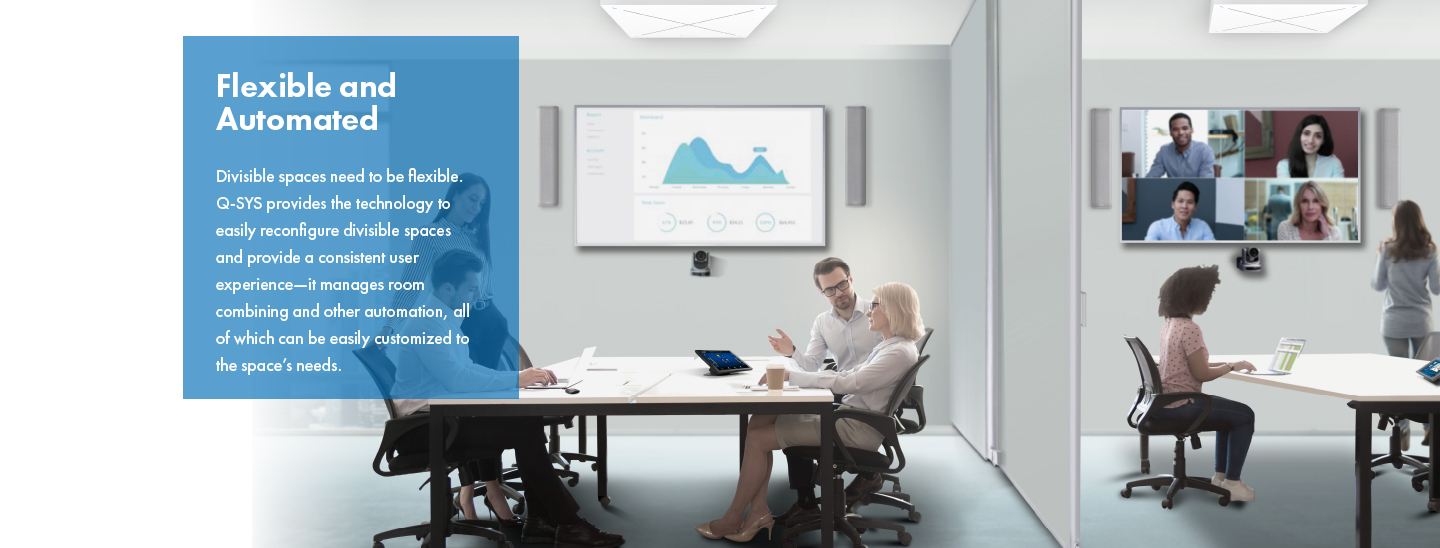
A divisible workplace room should support useful work in every approved configuration. Two smaller sessions may need independent meetings, microphones and content. The combined room may become a training classroom, leadership briefing or town hall with a presenter, audience questions and remote participants.
The design succeeds when staff can move between these modes without rebuilding the system or guessing which controls remain active.
Start with an operating brief rather than a product list. Record capacities, furniture layouts, presenter positions, meeting platforms, audience participation, interpretation, recording and support expectations.
An AV integrator in Shanghai for workplace technology can turn those activities into room states, signal paths and acceptance criteria that reflect the building, network and local service model.

Define the supported room states
Draw every configuration the business will actually use: fully divided, fully combined and any permitted partial combination. For each state, mark the front of room, displays, cameras, microphones, loudspeaker zones, collaboration console, lectern, wall connections and technician position.
If furniture can rotate or re-form, document the layouts that AV coverage is designed to support.
Limit the system to explicit, named modes. Training A, Training B, Combined classroom and Town hall are clearer than a technical matrix of endpoints. Each mode should define which rooms are joined, which sources are available and who controls them.
Unsupported arrangements should be labelled as such so facilities teams do not promise a layout that has never been engineered or tested.
Make partition state trustworthy
Partition contacts can report whether a wall is open or closed, but the control logic must address movement, incomplete closure and conflicting sensors. A wall change during a live meeting should not suddenly send one team's audio or confidential content into another space.
Require a confirmed transition and show the resulting room state on every relevant control interface.
Choose a safe default for uncertain information. That may mean keeping rooms separated until a trained operator confirms they are combined. Provide a documented manual recovery method if a contact fails.
The same principles apply to workplace rooms and flexible hotel ballroom AV systems in China, although corporate training normally needs closer integration with collaboration platforms and room accounts.
Select an architecture that can genuinely combine
A standard room appliance may be excellent for repeatable single rooms yet unsuitable for dynamic combining. Confirm whether the proposed processor, USB path, video distribution, control layer and collaboration design support every intended state.
Do not assume that two independent certified rooms automatically become one certified large room when a wall opens.
Q-SYS currently states that its RoomSuite Modular System does not support divisible or combinable rooms and directs those applications toward a Core-based system. The wider lesson is platform-neutral: check the current capability of the exact architecture, licences and software release rather than extending a small-room pattern beyond its documented use.
Design audio as zones with controlled relationships
Place microphone and loudspeaker zones around the architectural sections and supported presenter areas. In divided mode, each session needs intelligible local reinforcement or conferencing without leaking programme into the next room.
In combined mode, the DSP must join the correct zones, maintain useful level relationships and manage delay so speech remains coherent across the larger audience area.
Acoustic echo cancellation must follow the collaboration signal path in every mode. Reference routing, mute logic and far-end audio cannot remain tied to the wrong section after rooms combine. Test normal and quiet speech from seated learners, standing presenters and audience-question positions.
Sinoway's camera and microphone guide for medium and large meeting rooms provides a seat-by-seat approach to coverage and validation.
Choose camera views for teaching and discussion
Training creates more movement than a conventional boardroom. A presenter may stand by a display, use a whiteboard, walk between tables or invite a participant to speak. The camera plan should include a stable room view, a useful presenter view and audience coverage where remote participants need to follow discussion.
Each divided section needs views that still make sense on its own.
When rooms combine, avoid a single ultra-wide image that makes everybody tiny. Use additional cameras or purposeful presets only where they improve understanding. Switching should be calm and predictable, with a stable fallback when tracking confidence is low.
Verify sightlines after furniture and displays are installed because movable tables and portable monitors can block carefully planned shots.
Keep displays readable in every layout
A screen sized for one short room may become unreadable when participants sit farther away in combined mode. Calculate viewing distance for the smallest important content, not just video faces.
Multiple displays can preserve visibility, but they need clear rules: mirrored content, presenter confidence, far-end participants or independent sources. Document those roles for each room state.
Plan source connections where presenters will actually stand. Give each divided section a reliable local input and decide how wireless presentation, USB-C and HDMI guests are supported. In combined mode, determine whether any source can be sent everywhere or whether a lead room controls the session.
Clear source names are more useful than exposing a full routing matrix to everyday users.
Separate collaboration identity from physical walls
Room accounts, calendars and meeting joins require special attention. Two divided rooms may each have an account, console and booked meeting. A combined event usually needs one lead collaboration identity while the other system remains inactive or contributes approved peripherals.
Define how users know which room to book and which console to operate before a session begins.
Microsoft's current Teams meeting-room guidance notes that the largest, most complex spaces may combine microphone and loudspeaker types to capture a lecturer and audience. That flexibility still depends on certified components, supported licences and an engineered room system.
Recheck the exact approved configuration before procurement and after material platform changes.
Avoid multiple active meeting joins
A combined room should not accidentally join the same meeting from two independent room systems with open microphones and loudspeakers. That can create echo, duplicated audio and confusing control.
The combined-room workflow should identify one conferencing host and place secondary room systems into a known inactive or peripheral role. Users should not have to discover this through trial and error.
If the design supports different platforms or BYOD, define a single active path for camera, microphones and loudspeakers. Test guest laptops, platform switching and recovery after a cable is removed.
Sinoway's 2026 guide to meeting-room compute in China explains how Windows, Android and appliance choices affect peripherals, management and fallback planning.
Give users one clear control story
Every control panel should show the current room name and state. In divided mode, each section should expose only its own normal functions. In combined mode, one lead interface can control shared sources, displays, cameras and audio, while secondary panels show that the space is joined.
Prevent contradictory commands from two sides of the partition.
Keep daily controls concise: start, join, present, choose a supported layout, adjust permitted levels and end. Reserve routing, diagnostics and configuration for trained support staff. Ask users to test the interface with realistic time pressure.
If a facilitator cannot start a hybrid workshop after a brief introduction, the control design is still too dependent on technical knowledge.
Plan networking and USB deliberately
Networked audio and video can simplify distribution across flexible spaces, but the network becomes part of the room. Coordinate multicast, quality of service, clocking, VLANs, addressing, switch capacity, monitoring and security with IT.
Document which services must remain available for local presentation if cloud collaboration or an upstream network service is unavailable.
USB paths are equally important. A camera, DSP and room system may work in each divided section but require a different bridge or host relationship when combined. Map every USB host and device, confirm switching behaviour and test enumeration after mode changes and restarts.
A logical block diagram should show both AV signals and control dependencies.
Coordinate architecture, acoustics and accessibility
Movable walls have limited acoustic isolation, and sound can pass through ceiling voids or shared services. Review the partition rating, seals, ceiling, doors and HVAC paths before promising simultaneous confidential sessions. Lighting should support cameras and presenters without washing out displays.
Power, floor boxes and cable routes must remain safe across every furniture arrangement.
Include accessible seating, hearing support, readable control labels and clear sightlines in each room state. A participant should not lose access when two rooms combine or tables move. Verify microphone access for audience questions and provide an alternative to standing at a fixed lectern.
Inclusive design belongs in the brief and commissioning plan, not as a late accessory.
Commission transitions, not only steady states
Test every approved mode with real workflows: two simultaneous meetings, an instructor-led class, a hybrid workshop and a combined town hall. Verify audio isolation, camera views, display roles, room accounts, content sharing, control permissions and shutdown.
Then change modes and confirm the system reaches the new state without stale routes or hidden active microphones.
Include failure tests for a partition sensor, network endpoint, secondary display and collaboration console. Confirm that users receive a useful message and support teams can restore a known configuration. Store approved DSP, control, camera and network files with the commissioning record.
The regional AV standards guide for China and Asia shows how consistent evidence supports multiple sites and suppliers.
Operate the room as a managed service
Flexible rooms contain more states and dependencies than standard meeting rooms, so monitoring must provide context. An alert should identify the current room identity, affected endpoint and business impact. Maintain accurate asset records, supported software baselines and configuration backups.
Pilot updates in a representative room or mode before applying them to a critical training facility.
Define pre-event checks for leadership broadcasts and important training days. Local support should know the room modes, manual recovery steps and spare strategy. Sinoway's office AV management guide for China and managed AV services in Shanghai and China explain how monitoring, change control and onsite response combine around room readiness.
How should organisations choose an AV integrator in China?
Ask the integrator to demonstrate the full room-state matrix, not only a polished combined-room interface. Review audio coverage, camera views, collaboration identities, network dependencies, control permissions, failure behaviour and commissioning scripts.
A capable AV integrator in China should coordinate workplace, IT, facilities, architecture and platform requirements before installation begins.
For a Shanghai office, an experienced audiovisual company in Shanghai should also provide current product validation, local procurement, bilingual coordination where needed and accountable post-handover support.
Compare partners on the evidence they will deliver: design records, tested configurations, user training, service response and lifecycle ownership. The best design makes flexibility repeatable rather than impressive only during a demonstration.