
What changes when a meeting room becomes larger?
Distance changes everything. Participants at the far end become small in a single wide camera view, speech reaches the nearest microphone with less level, and displays may no longer be readable from every seat. Reflections from glass and hard surfaces also accumulate.
A room can look impressive in person yet make remote attendees work too hard to identify speakers or understand quiet conversation.
Begin with a scaled plan showing tables, chairs, displays, doors, presentation areas and permitted furniture layouts. Mark the people who must be seen and heard in each scenario. A Shanghai AV integrator for meeting-room solutions can then turn those human positions into camera sightlines, microphone zones, loudspeaker coverage and a complete signal flow.
Define the meeting before defining the equipment
A twelve-person project room, a long executive boardroom and a divisible training room may have similar floor areas but very different behaviours. Document who speaks, whether people present while standing, how often the furniture moves, which meeting platforms are approved and whether external guests bring laptops.
For spaces that change size, Sinoway's divisible training room AV guide for China explains how room states, collaboration identities and transitions should be engineered together.
Write acceptance criteria in user terms. Every seated participant should be intelligible at normal speech level. Remote viewers should recognise the active speaker without distracting camera motion. Shared content should remain readable from the rear seats.
These outcomes are more useful than a bill of materials because they tell the audiovisual company in China what the finished room must prove.
Know where a single video bar is enough
A single video bar can be the simplest dependable answer when the room remains within the manufacturer's intended size, the display wall gives the camera a clear view and participants sit within the tested audio range. It reduces cabling and makes the support path understandable.
It should not be stretched into a long room merely because digital zoom can produce a close picture in a demonstration.
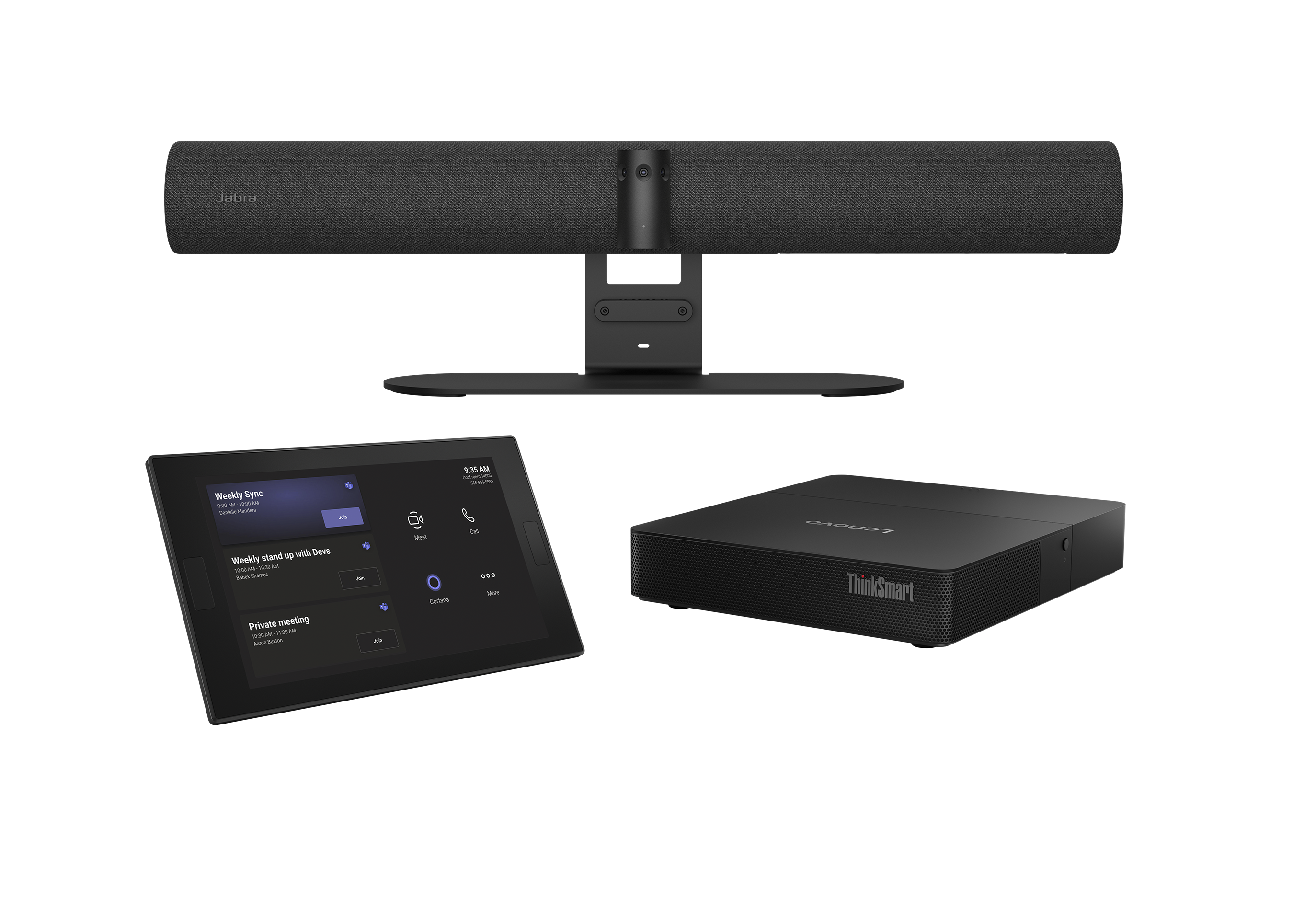
The current Jabra PanaCast 50 Room System 2 combines a PanaCast 50 video bar, Lenovo ThinkSmart Core Gen 2 and controller for Microsoft Teams Rooms. Jabra positions it for small and medium rooms and describes 180-degree Panoramic-4K video, eight beamforming microphones and USB-C sharing, charging and BYOD.
Validate the exact bundle, room conditions and regional availability at procurement.
Do not confuse a wide view with useful detail
A wide field of view is valuable in a shallow room because it can include participants seated close to the display wall. In a long room, however, fitting everybody into one image can make faces too small for meaningful remote interaction. Digital crops can help only while the source image contains enough detail and lighting.
They cannot overcome an obstructed sightline or an unsuitable camera position.
Review test images at the size remote participants will actually see, not only on the large display inside the room. Check backlighting, eyeglass reflections, windows, bright presentation content and participants looking toward different displays.
If the one-camera view becomes too broad, add purposeful viewpoints rather than relying on aggressive crops that change quality as speakers move.
Build a simple camera shot plan
A useful shot plan starts with an establishing view of the whole table, then adds only the closer views needed for the meeting. A long boardroom may use cameras from both ends so each side is seen more frontally. A training room may need separate audience and presenter views.
Every preset should have a reason, a defined target and a fallback when no reliable speaker location is available.
Keep cameras close to the natural viewing axis so participants appear to address remote colleagues. Avoid extreme side angles, views blocked by monitors and constant mechanical movement.
Sinoway's intelligent multi-camera boardroom design guide explains how microphone data, camera positions and switching rules must be designed together before automated tracking can feel calm.
Use multi-camera systems for genuine coverage needs
Multiple cameras are justified when one position cannot provide both context and useful participant detail. The design needs a stable wide shot, logical close views and switching rules that respect the conversation. More cameras create more network or video paths, control dependencies, configuration data and service points.
The operational cost should earn a visible improvement for remote participants.
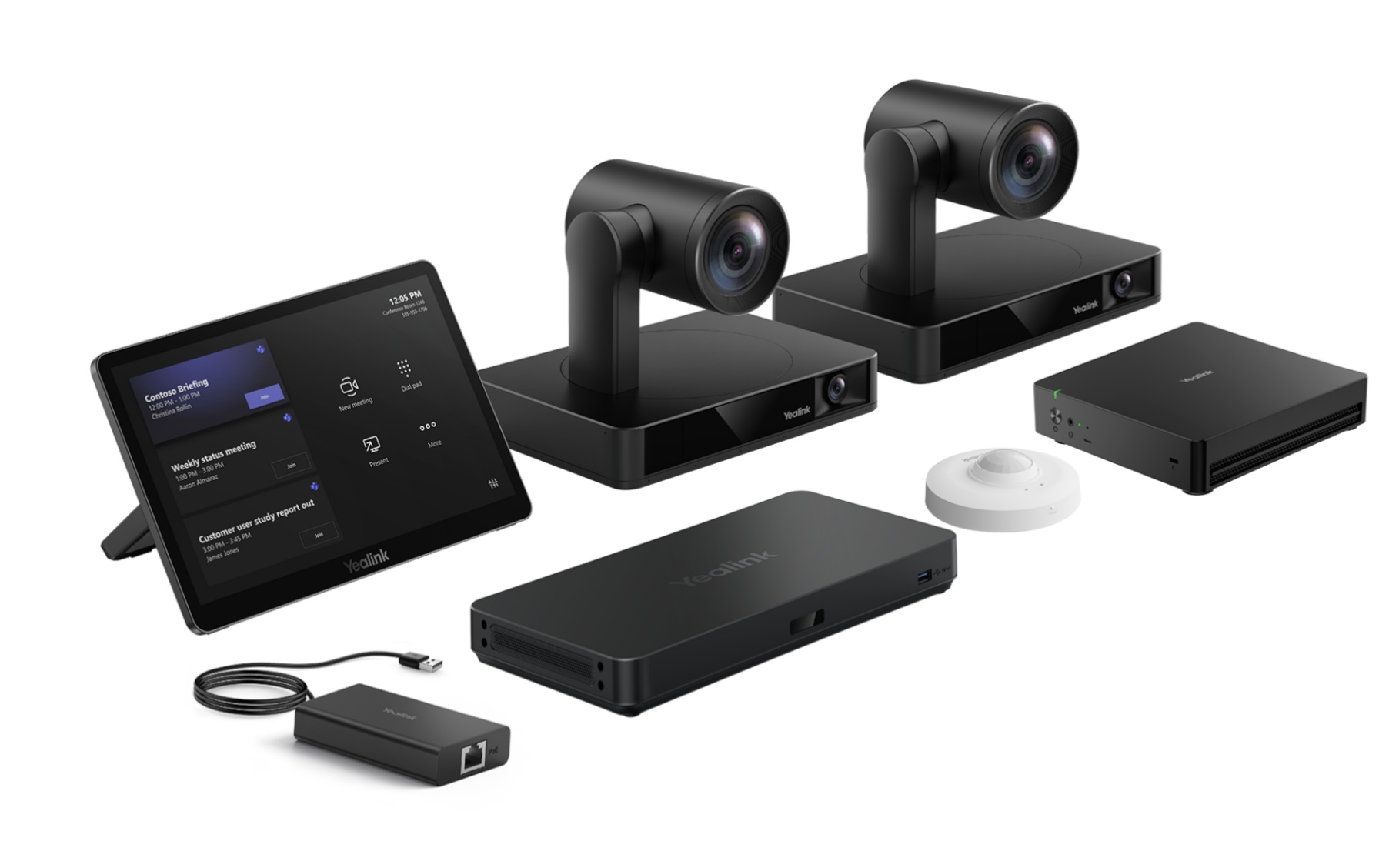
Yealink's current MVC S90 Microsoft Teams Rooms system is positioned for boardrooms and large to extra-large spaces. Its listed bundle includes MCore 4, MTouch Plus, dual UVC86 cameras, AVHub, RoomSensor and a BYOD extender; Yealink says AVHub can support up to nine cameras.
That scalability is a design option, not a recommendation to fill every input.
Make camera switching follow the conversation
The best switching is often the least noticeable. Hold a view long enough for the remote audience to understand it, avoid cutting on every short acknowledgement and return to a stable group view when location confidence is low.
If two people speak across the table, a wider composition may communicate the exchange better than alternating tight shots.
Test quiet speakers, interruptions, overlapping speech, side conversations and people turning away from the microphones. Also test silence, because the system needs a predictable resting view. Record switching delays and boundaries as part of commissioning.
If furniture can move, define the layouts that automation supports and what users should select when the room changes.
Understand intelligent framing and platform dependencies
Camera intelligence may run inside a video bar, a separate processor, the room application or the cloud. Microsoft currently documents Multi-Stream IntelliFrame for supported Teams Rooms on Windows cameras, including Jabra PanaCast 50 and Yealink MVC S90 bundle configurations.
The experience also depends on the required Teams Rooms Pro licence and applicable policies. Similar product names do not guarantee the same feature path.
At design and commissioning, verify the exact room compute, camera model, firmware, application version, licence and tenant settings. Then confirm what remote participants receive in the actual client.
Sinoway's 2026 meeting-room compute guide for China provides a practical framework for choosing Windows, Android or appliance architecture without relying on outdated platform stereotypes.
Design microphone coverage seat by seat
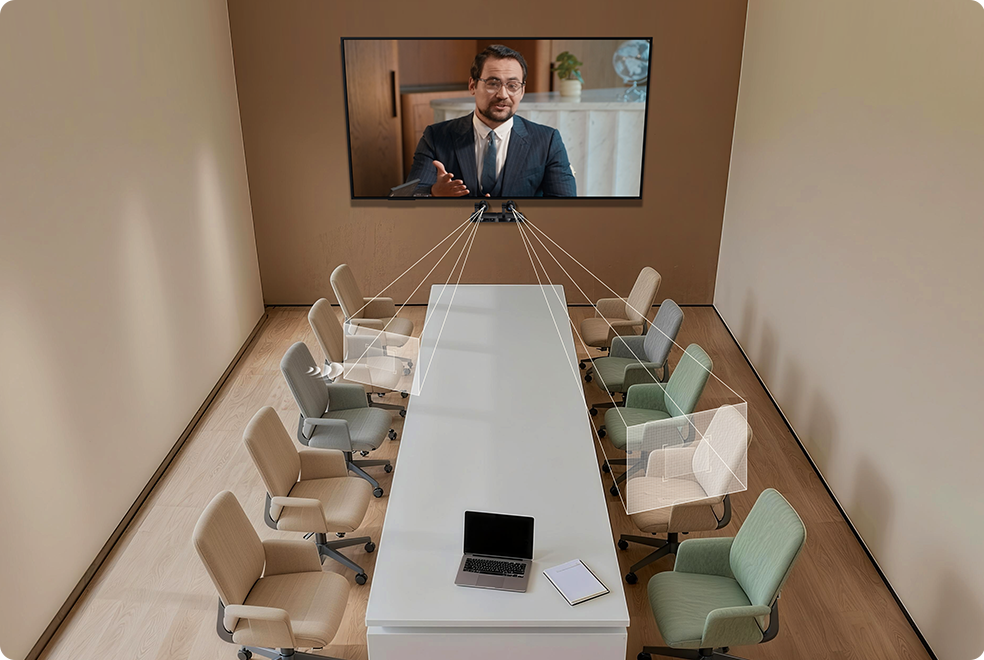
Microphone quantity is not a reliable measure of coverage. The designer should show each microphone's intended pickup area, the distance to talkers and the seats at coverage boundaries. A quiet participant must remain intelligible without raising system gain until ventilation noise and room reflections dominate.
Moving chairs, standing presenters and accessibility positions belong on the same plan.
Microsoft's current room guidance calls for certified microphones that cover all seats in medium and large rooms. That principle still requires engineering. Test normal speech, quiet speech and people facing away from the table. Listen from a remote endpoint using headphones and a typical laptop loudspeaker.
Local room occupants cannot judge the transmitted mix accurately from their seats.
Choose table, ceiling or mixed microphones deliberately
Table microphones place pickup close to talkers and can provide clear, predictable zones. They also require cable routes, tabletop space and coordination with movable furniture.
Ceiling arrays keep tables clear and may fit divisible or reconfigurable rooms, but mounting height, ceiling type, HVAC noise, loudspeaker position and room reverberation have a greater effect on the result.
A mixed design can support a fixed executive table plus a standing presentation area, but every additional microphone path must reach the conferencing platform through a controlled mix. Choose form factor after reviewing architecture, furniture, accessibility, cleaning, maintenance and privacy.
Product aesthetics should not override the acoustic evidence for the room.
Treat the DSP as part of the conversation
In integrated rooms, digital signal processing manages microphone mixing, echo cancellation, equalisation, routing and often the location information used for camera decisions. Configure zones to match real seats and presentation areas.
Keep gain structure consistent from microphones through the conferencing interface, and protect far-end speech from being mistaken for a local talker.
Measure and listen. Confirm echo cancellation during double-talk, when local and remote participants speak simultaneously. Check mute synchronisation, far-end reference routing, room reinforcement and the behaviour after a restart. Store the approved DSP file, software version and credentials securely.
A future service engineer should be able to restore the room without reconstructing undocumented logic.
Improve the room before adding processing
Hard ceilings, glass walls and large tables can create reflections that reduce speech clarity and confuse location-based automation. Acoustic treatment placed at meaningful reflection areas may improve performance more than another algorithm or microphone.
Reduce unnecessary mechanical noise, isolate vibrating equipment and keep ceiling microphones away from supply diffusers where practical.
Lighting is equally important for video. Give faces balanced front light, control daylight and avoid placing a bright display directly behind a presenter. Coordinate acoustic panels, cameras, microphones, loudspeakers, sprinklers, lighting and HVAC before construction.
Late relocation can compromise both performance and the interior design.
Plan loudspeaker coverage and privacy
Remote speech should reach every seat at a comfortable, even level. One loudspeaker near the display may be adequate in a medium room, while a longer room can need distributed reinforcement with controlled delay and level.
Keep loudspeakers out of sensitive microphone zones where possible and verify echo-cancellation references for every playback path.
Consider sound escaping through partitions and doors, especially in executive rooms. Speech privacy is an architectural and acoustic requirement, not a feature that conferencing equipment can solve alone. Test adjacent spaces during acceptance.
Where rooms divide, confirm that microphone, loudspeaker, camera and display routes follow the partition state without exposing one meeting to the other.
Design network, power and service access
Large rooms can include networked cameras, microphones, DSP, control, room compute and monitoring. Agree addressing, switch capacity, VLANs, multicast rules, quality of service, time services and security ownership with IT before installation.
Document which device receives updates from which platform and how installers obtain temporary access without retaining unnecessary privileges.
Provide labelled cable paths, ventilation, reachable reset points and a safe power sequence. A camera above joinery or a processor buried behind a display may work on opening day but create long outages during service.
Apply the portfolio discipline described in Sinoway's regional AV standards guide for China and Asia so every site receives consistent records and recovery methods.
Commission with real meetings, not isolated devices
Run the organisation's actual meeting platform with representative people in every approved seat. Join internal and external calls, share content, ask quiet and loud participants to speak, move between speakers and use the presenter position. Review camera composition and transmitted audio from several remote endpoints.
Test the room in daylight and evening conditions where both occur.
Then create controlled failures. Disconnect a camera, interrupt a network path and restart the room according to the support procedure. Confirm that monitoring identifies useful symptoms and the system returns to a predictable state.
Sinoway's managed AV services guide for China explains why asset records, actionable alerts and accountable local response are essential after handover.
Specify the outcome and preserve simplicity
A medium or large room should not expose its technical complexity to users. They should join from the calendar, share content, mute confidently and leave the system ready for the next meeting.
Behind that interface, camera views, microphone zones, DSP, networks and room compute can be sophisticated, but each layer needs documented ownership and a clear reason to exist.
Start with coverage evidence, choose the smallest architecture that meets the brief and verify the exact supported products before purchase. Sinoway Technology supports organisations seeking an AV integrator in Shanghai and China to design, integrate, commission and maintain medium and large meeting rooms as dependable workplace infrastructure.